In this guide (14 sections)
- Why email still matters
- What you need
- Free tools to start with
- Lead magnet ideas that work
- Build a simple opt-in page
- Where to share your opt-in page for free
- What to send new subscribers
- Keep your list healthy
- Writing subject lines people open
- Segmenting: sending the right email to the right people
- Growing faster: content upgrades and quizzes
- Email rules you need to follow
- A 30-day list-building plan
- Numbers to watch
An email list is the one audience you actually own. Social reach can disappear overnight when an algorithm changes or an account gets restricted; your list stays. The good news is that you can start building one without spending anything. This guide covers the tools, the lead magnet, where to get sign-ups and exactly what to send.
Why email still matters
- You own it. You can export your list and move tools any time.
- It reaches people directly. No algorithm decides whether subscribers see your message (though spam filters still matter).
- It builds trust over time. Most people need to hear from you several times before they buy anything you recommend.
- It works with every traffic source. Whether people find you on TikTok, Pinterest, YouTube or ads, you can bring them to the same list.
What you need
- A lead magnet: a reason to sign up.
- An opt-in page: a simple page with a headline, a few bullet points and an email box.
- An email tool: to store subscribers and send automatic emails.
- Traffic: people who see the page.
Free tools to start with
Many email platforms offer free plans for small lists, usually with a basic landing page or form builder and simple automations. Well-known options include MailerLite, Brevo and Kit, among others. Free-plan limits (number of subscribers, emails per month, automation features, branding) change often, so compare the current plans on their sites before choosing.
When comparing, look for:
- A free landing page or form you can link to from social profiles.
- Automations (an email series that sends by itself after someone joins).
- Tags or segments, so you can treat different subscribers differently.
- Easy export, in case you switch later.
Lead magnet ideas that work
The best lead magnets solve one small problem quickly. Long ebooks rarely get read.
| Type | Example | Why it works |
|---|---|---|
| Checklist | "10 things to set up before your first sale" | Quick to use, easy to make |
| Template / swipe file | 30 email subject lines, 20 post templates | Saves time immediately |
| Mini-course | 5-day email course | Builds a habit of opening your emails |
| Video walkthrough | "Set up X in 15 minutes" | Builds trust fast |
| Resource list | The tools I actually use | Naturally includes recommendations |
| Quiz or calculator | "Which side hustle fits your week?" | Interactive, very shareable |
Build a simple opt-in page
- Headline: the result, not the format. "Plan a week of meals in 20 minutes" beats "Free meal planning PDF".
- 3 bullets: what's inside or what they'll be able to do.
- One field: email only (first name optional). Every extra field lowers sign-ups.
- One button with a specific label: "Send me the checklist".
- Privacy line: "No spam. Unsubscribe anytime."
Check it on your phone. Most visitors from social media will be on mobile.
Where to share your opt-in page for free
- Your social profile bios and pinned posts.
- The end of every short video ("free checklist in my bio").
- Helpful answers in groups and forums, where links are allowed.
- Pinterest pins pointing to the page.
- Your email signature and messaging app profiles.
- YouTube video descriptions and pinned comments.
More ideas in free traffic for affiliate links.
What to send new subscribers
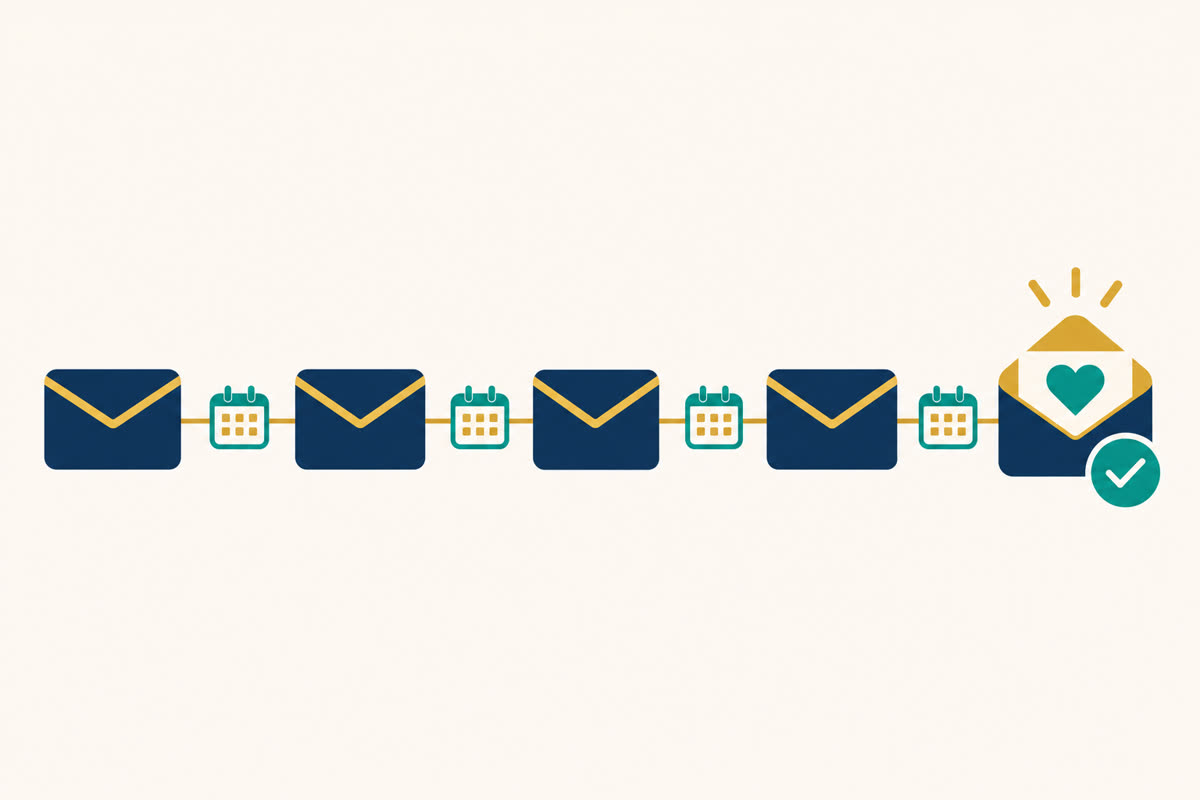
A welcome series turns a stranger into someone who recognises your name. Here's a simple five-email structure:
- Email 1 (immediately): deliver the freebie, say who you are in two lines, and tell them what to expect.
- Email 2 (day 1): one quick, useful tip they can use today.
- Email 3 (day 2): a short, honest story about a problem you faced and what you learned.
- Email 4 (day 3): a recommendation that genuinely helps, why you like it, who it's not for, with your affiliate link and a disclosure.
- Email 5 (day 4–5): answer common questions about it, and invite replies.
After that, keep sending useful emails 2–4 times a week, mixing tips, stories and occasional recommendations.
Keep your list healthy
- Stop fake sign-ups: use double opt-in or an email checker, especially if you buy traffic.
- Clean regularly: remove people who haven't opened in a few months.
- Always include an unsubscribe link and your physical address.
- Never buy lists. It hurts deliverability and often breaks the law.
A smaller list of people who read your emails beats a big list nobody opens.
Writing subject lines people open
Your subject line decides whether anything else gets read. Patterns that tend to work:
- Specific benefit: "A 10-minute fix for your opt-in page"
- Curiosity with honesty: "The mistake I made for six months"
- Question: "Do you do this when you post?"
- Personal and plain: "Quick question" or "About yesterday's email"
- List: "3 tools I use every week"
Segmenting: sending the right email to the right people
As your list grows, not everyone needs every email. Simple segments to start with:
- By source: people from YouTube may prefer different content than people from Pinterest.
- By interest: tag subscribers who click links about a topic and send them more on it.
- By engagement: send fewer emails to people who rarely open; re-engage or remove them later.
- Buyers vs non-buyers: don't keep pitching a product someone already bought.
Growing faster: content upgrades and quizzes
Once you have a few posts or videos that get steady views, add a content upgrade: a bonus specific to that piece. A video on "how to plan a week of meals" can offer "the printable shopping list from this video". Because it's tightly matched, it often converts better than a general freebie.
Quizzes also work well: "Which side hustle fits your week?" Visitors answer a few questions and enter their email for their result, and you learn what each subscriber wants.
Email rules you need to follow
| Rule | What it means in practice |
|---|---|
| Consent | Only email people who opted in. Never add contacts without permission. |
| Identification | Clear sender name and honest subject lines. |
| Unsubscribe | A working link in every marketing email, honoured promptly. |
| Physical address | Required in commercial emails in many countries (for example under CAN-SPAM). |
| Data protection | Extra requirements for subscribers in some regions (for example GDPR in Europe). |
This isn't legal advice; check the rules that apply where you and your subscribers are.
A 30-day list-building plan
- Days 1–3: choose a lead magnet, create it, build your opt-in page.
- Days 4–5: write and load a five-email welcome series.
- Days 6–7: add the page link to every profile you own.
- Days 8–21: publish daily on one channel and mention the freebie when relevant.
- Days 22–25: look at your opt-in rate; test a new headline if it's low.
- Days 26–30: add a content upgrade to your best-performing post or video.
Numbers to watch
- Opt-in rate: sign-ups ÷ page visitors. If it's low, change the headline or the lead magnet.
- Open rate: if it's falling, look at subject lines, sending times and list cleanliness.
- Click rate: are people interested in what you share?
- Unsubscribes and spam complaints: a spike means something in your recent emails missed the mark.
Building your list is step one of most online businesses. See how it fits into the whole plan in step-by-step affiliate marketing for beginners.
Frequently asked questions
Can I build an email list for free?
Yes. Several email tools have free plans for small lists, and free traffic like social posts, groups and short videos can bring sign-ups. You only need to pay once your list grows past the free limits.
What is a lead magnet?
Something free and useful you give in exchange for an email address, for example a checklist, template, short guide, mini-course or a free tool.
How often should I email my list?
Daily for the first few days after someone joins, then 2–4 times a week is common. Consistency matters more than frequency; every email should be worth opening.
Is it legal to email people who sign up?
Yes, if they opted in. Include your physical address and an unsubscribe link in every marketing email, honour unsubscribes quickly, and follow the rules in your country (CAN-SPAM in the US, GDPR in Europe).
Should I buy an email list?
No. Bought lists hurt your deliverability, often break the law, and the people on them didn't ask to hear from you.
Some links on this site are affiliate or referral links, and we may earn a commission if you buy through them. Results depend on your traffic and effort. Earnings are not guaranteed.